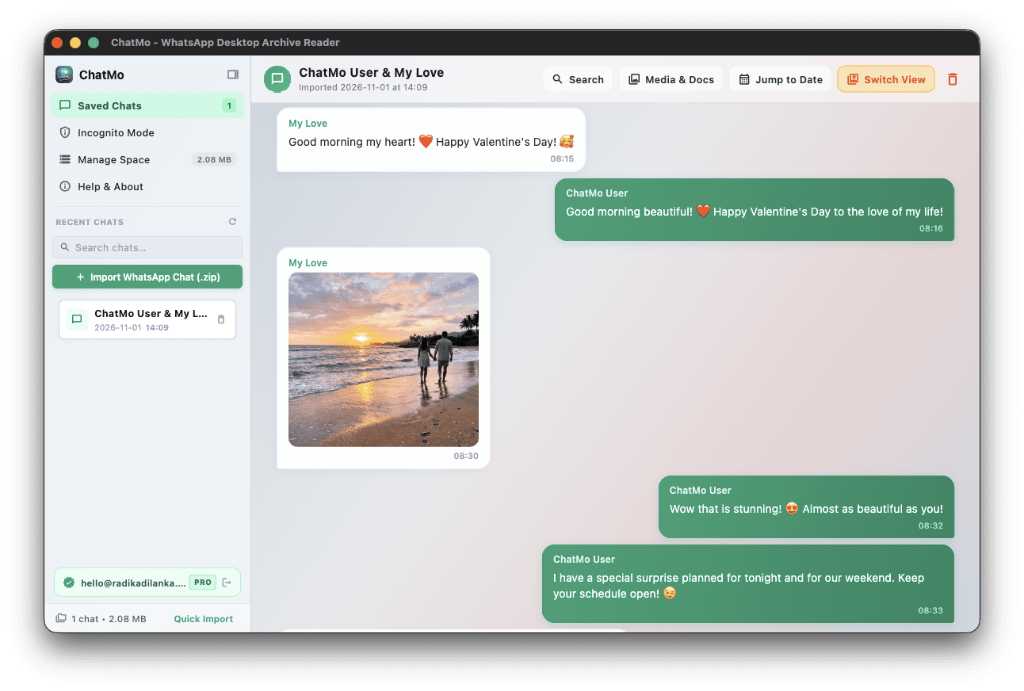



Your WhatsApp history,kept on your Mac.

In a way that you can use easily.

ChatMo lets you

free up space on your phone (iOS & Android).

keep chats and media on your Mac.

search and find chats and media in seconds.

play voice notes and view media offline.

free up space on your phone (iOS & Android).

keep chats and media on your Mac.

search and find chats and media in seconds.

play voice notes and view media offline.

free up space on your phone (iOS & Android).

keep chats and media on your Mac.

search and find chats and media in seconds.

play voice notes and view media offline.

Free to try$4.99 one-time purchaseNo account needed

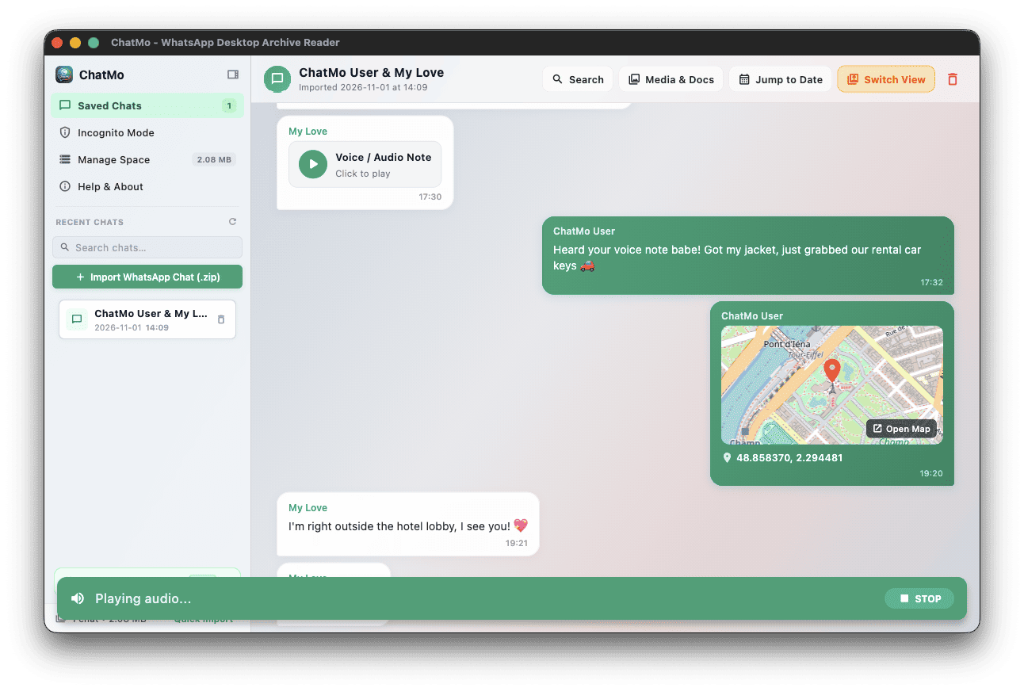
Play exported voice notes with real waveforms and location previews.

ChatMo app playing a WhatsApp voice note and showing an offline location map
ChatMo displaying full resolution beach photos and text conversations
Voice Note Player
Location & Maps
A family looking through a photo album together

Family

Hear the voices you thought were gone.

Bedtime stories, birthday wishes and the laughter of people you love. Play any voice note back on your Mac whenever you miss them.

A professional working on a laptop in an office

Work

Find the exact message in seconds.

Arguing about a price or a deadline? Search the words you need and show the original message from months ago.

Two friends laughing together over coffee

Friends

Keep the group chats that made you laugh.

Years of trips, plans and inside jokes take up a lot of space. Move them to your Mac and relive them any time.

What it does

Find anything. Keep everything.

The features people use most, built to be understood at a glance.

Search by any word

Type a word, a name or a phrase. ChatMo finds it across every chat you have imported.

  • Final quote, approved

    Sarah K. · 14 Mar 2024

    Looks good. I signed the signed quote and sent it back.

  • Revised signed quote

    Sarah K. · 2 Mar 2024

    Here is the signed quote with the new delivery date.
Go to any day

Pick a date and the conversation opens exactly as it looked that day.

Photos and videos at full quality

Every picture and clip shared over the years, uncompressed.

Every voice note, playable

Hear a birthday message again, or your child saying their first words.

iPhone and Android

Export from either phone. Open it the same way on your Mac.

Private by design

Nothing is uploaded. Your chats never leave your Mac.

How it works

Three steps. About ten seconds each.

No account and no app on your phone. Export in 2 quick taps, send to your Mac, and click Import inside ChatMo.

1In WhatsApp (2 steps)

Export from WhatsApp

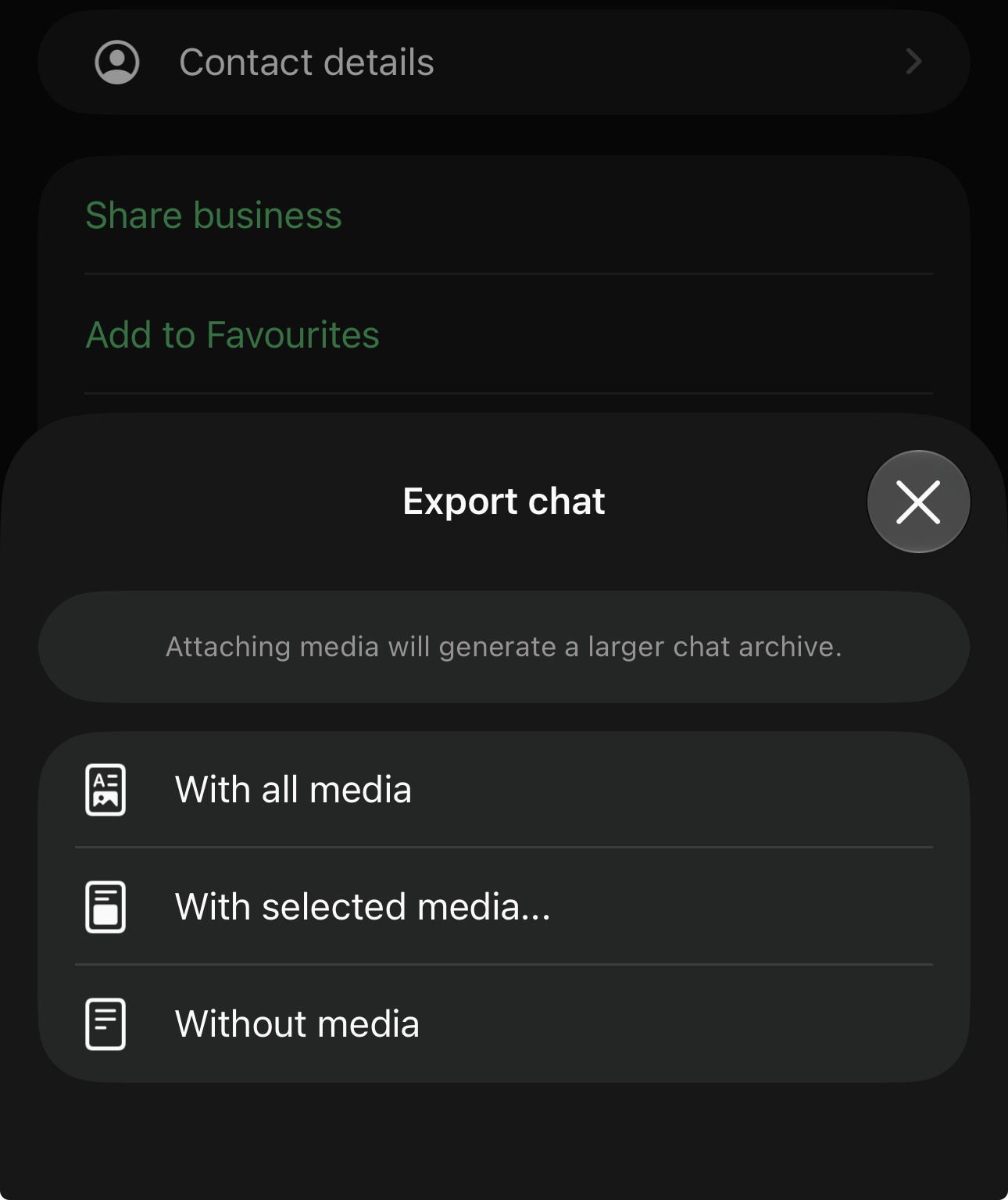
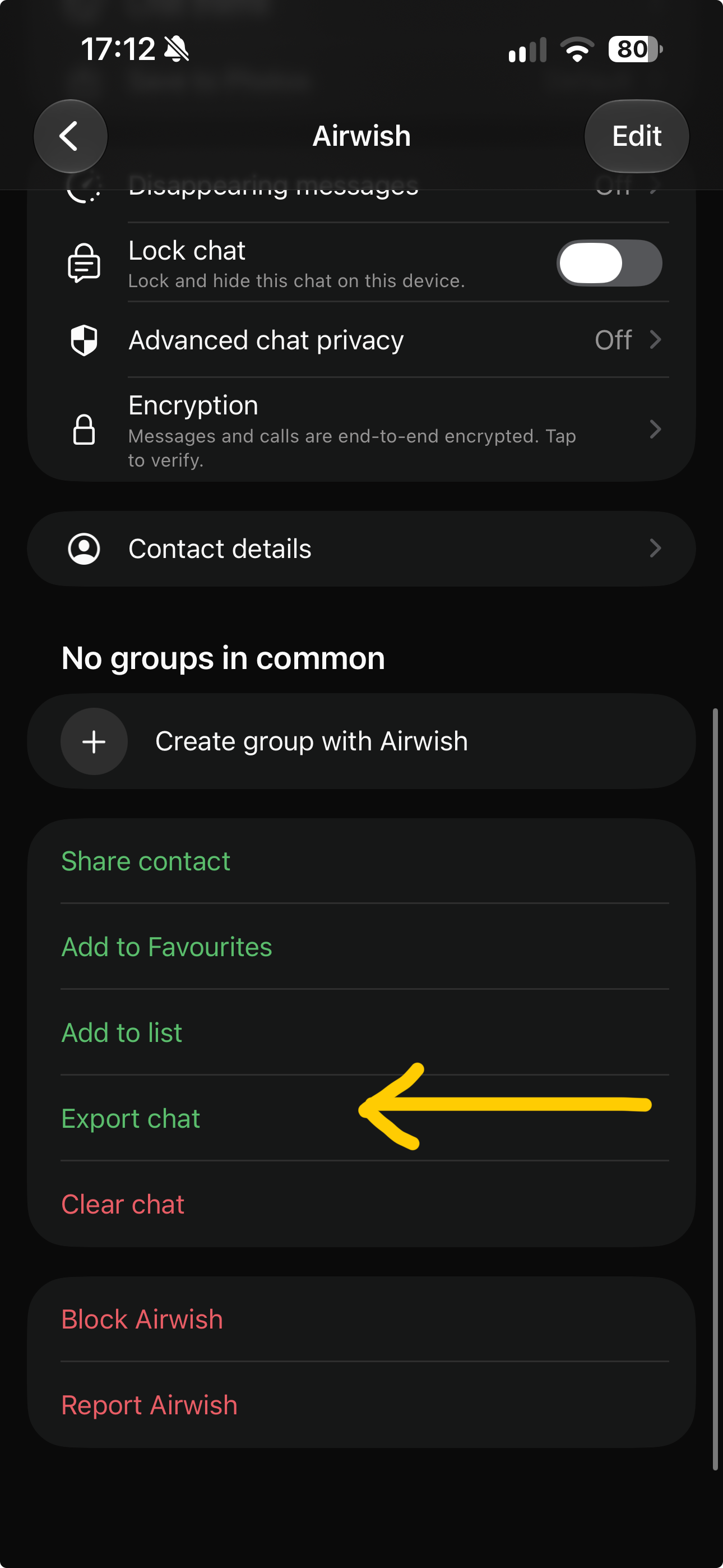
Open chat info in WhatsApp, tap Export Chat, then tap Attach Media to preserve all voice notes and photos.

WhatsApp chat settings showing Export Chat option1. Tap "Export Chat"
WhatsApp prompt asking to Attach Media or Without Media2. Tap "Attach Media"
Important: Always tap Attach Media so voice notes, videos, and full-resolution pictures are bundled in the .zip export.
2AirDrop or Cable (1 step)

Send the .zip to your Mac

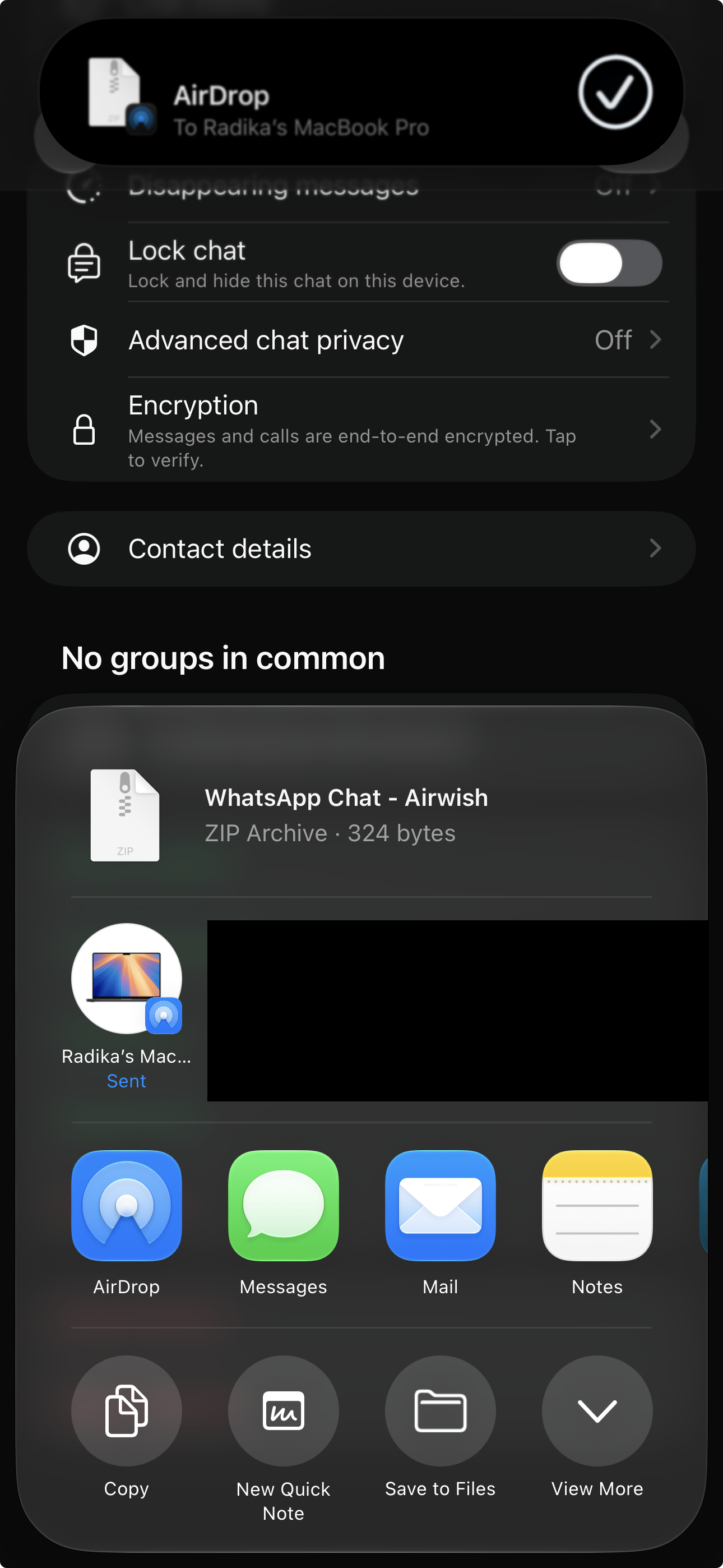
The export produces a standard .zip archive. Tap AirDrop to send it directly to your Mac in seconds.

Step 3: AirDrop to Mac
iOS Share sheet showing AirDrop option to send WhatsApp zip to Mac3. AirDrop to your Mac
No unzipping needed: The file lands in your Downloads folder. Leave it zipped—ChatMo imports it directly.
3In ChatMo for Mac (1 step)

Import & Relive on Your Mac

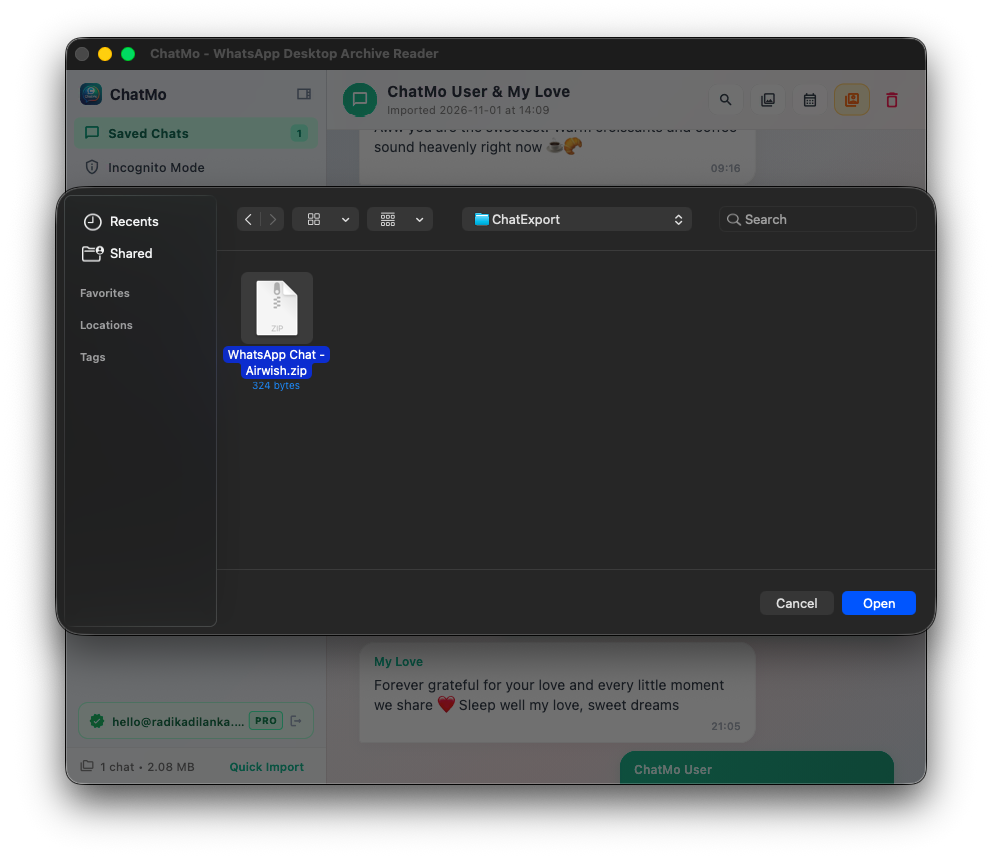
Open ChatMo on your Mac and click the green + Import WhatsApp Chat (.zip) button to select your file. Your conversation, voice notes, and photos are immediately available to read and search.

One-Click File Selection

Click the green import button and choose the exported .zip file.

Instant Offline Access

All messages, voice notes, and media load locally on your Mac without internet.

100% Private & Offline: ChatMo reads and searches your chat archives directly on your Mac. Nothing is ever uploaded to any cloud server.
ChatMo Mac app interface showing + Import WhatsApp Chat (.zip) button
Click "+ Import WhatsApp Chat (.zip)"
A hand holding a smartphone

Phone storage

Get your phone back.

0+GB freed

Old WhatsApp media is often the biggest thing on a full phone. Save it on your Mac first, then decide what to clear.

Deleting on your phone

  • Old messages are gone for good after one careless tap.
  • Voice notes from loved ones cannot be played again.
  • No proof left when you need a receipt or an agreement.

Keeping it on your Mac

  • Move big chats to your Mac and get the space back on your phone.
  • Every voice note and photo stays in original quality.
  • Search a word or pick a date to reach the exact conversation.

Before you delete anything, open the exported file in ChatMo and check that everything came across.

Coming next

More is on the way, included in your pass

Everyone who buys ChatMo today gets every future update at no extra cost.

Coming soon

Printable photo books

Turn a whole conversation into a beautifully styled book, perfect for anniversaries and gifts.

Coming soon

Group chat enhancements

Filter discussions by participant, explore sender galleries, and navigate large group chats seamlessly.

In design

Conversation insights

Fun stats like who texted first, your busiest chatting hours and your most used emojis.

In design

Private locked chats

Lock sensitive chats behind Touch ID or a master password, so family members cannot peek.

Early bird offer

Pay once. Keep it on your Mac.

No monthly bills and no recurring charges. Buy ChatMo Pro once for your Mac, with all future app updates included.

ChatMo Pro

Save 75%

Read unlimited conversations on your Mac.

$4.99$19.99

One-time payment. No subscriptions.

  • Unlimited conversation imports
  • Full media viewer for photos, voice notes, videos and PDFs
  • Instant search across every message and name
  • Private mode to check sensitive chats without saving
  • 100% offline. Your chats stay on your own computer
  • All upcoming features included, such as photo books and group chat enhancements
  • Priority support straight from the creator
Order ChatMo Pro for $4.99

Try it first. Test ChatMo with your own chat exports for free before you upgrade.

Secure checkout via PayHere. License activated within 5 hours of payment confirmation.

Questions

Frequently asked questions

Can anyone else see my messages?+

No. ChatMo works entirely offline on your Mac. It never sends your messages, contacts or photos to the internet.

How do I get my chat out of WhatsApp?+

Open the chat, tap the contact or group name, scroll down and choose Export Chat. Pick Include Media to keep photos and voice notes, then send the file to your Mac with AirDrop and open it in ChatMo.

Does it work with iPhone and Android exports?+

Yes. ChatMo understands exports from both iPhone and Android and displays everything cleanly.

Is it really a one-time payment?+

Yes. There are no subscriptions. You pay once for ChatMo Pro, including future app updates.

Why should I buy the early bird pass now?+

Major features like photo book export and group chat enhancements are on the way, and the price will go up when they launch. Buying today locks in your Pro license at the current early bird price.

Still have a question? Email us at info@radikadilanka.com

Your WhatsApp history, kept on your Mac.

Download ChatMo for free to try it with your chats, or upgrade to ChatMo Pro for $4.99 with a one-time purchase.